Skip to the content

Bill Walsh College Football '95E L E V A T E D

A free mod for the Sega Genesis game Bill Walsh College Football '95. It fixes the fatigue bug and adds new formations and plays, harder CPU difficulty levels, and full seasons with bowls or a playoff. There are two editions: the 107 Division I-A teams of 1994, or the 138 FBS teams of 2026.

The game is not included. You patch your own copy.

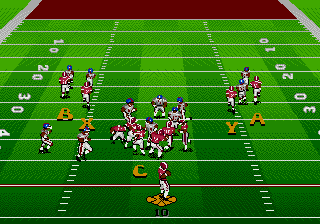
A 2026 Season Edition game: a 69-yard catch by Delaware's #1 Brandon Rehmann, then the recap and a 50+ Yard Catch milestone

100% Free

The patches and both apps are 100% free, forever. Never pay for this mod.

Fan-made

Made by a fan. Not affiliated with or endorsed by EA, the NCAA, or any school or player.

Game not included

You need your own copy of Bill Walsh College Football '95 (USA) to patch.

Two editions

Both editions have the same features. They have different teams, rosters and postseasons.

The 1994 Season Edition title screen

1994 Season Edition

Teams
107: every Division I-A team of 1994
Conferences
The 11 conferences of 1994
Schedule
Random, or the real 1994 schedule
Season
11 weeks (the real schedule: Weeks 0 to 13), the SEC Championship Game, then a bowl week
Postseason
The SEC Championship Game, then the 19 bowl games of the 1994 season
Poll
Starts from the real 1994 preseason AP poll
Rosters
Real 1994 names for 2,962 of 3,424 players. Every player has a number and ratings
The 2026 Season Edition title screen

2026 Season Edition

Teams
138: every FBS team of 2026 (28 with newly made art)
Conferences
The 2026 conferences
Schedule
Random, or the real 2026 schedule
Postseason
Conference title games, then a 12-team playoff. Or a 24- or 4-team playoff, a BCS title game, or none
Rosters
2026 rosters with player names, rated from College Football 27
Rules
Today's clock rules (the clock keeps running after first downs until the last 2:00 of a half) and today's overtime (no ties; two-point tries from the 3rd overtime)

The fatigue fix

In the original game, a running back loses about 27% of his energy on a short carry and gets back about 4% before the next snap. After two or three carries in a row he plays well below his ratings until the next timeout. This mod started as a fix for that.

In Elevated, every player loses energy for what he does during a play: how far he runs, how long he is in a block, and the hits he takes. At every snap, each player recovers a quarter of the energy he has lost.

OriginalElevated
Who gets tiredMostly ball carriersEvery player, by what he does
Recovery at each snapAbout 4% energyA quarter of what he lost
After a timeout or halftimeFull energyFull energy
Z held before the snap: an energy bar over every player
Hold Z before the snap to see every player's energy (6-button pad).

New features

A slot receiver goes in motion across the formation and his defender follows

Motion, flips and shifts before the snap

On offense, you can send a back or receiver in motion (backs run out to the slot, and several players can go in motion one after another), and flip the play to the other side at the line. On defense, you can shift the line, the linebackers or the safeties a step left or right. Man-to-man defenders follow a player in motion, and the CPU defense usually realigns when you flip the play.

  • orPick the player to send in motion
  • orSend him in motion
  • A, thenXFlip the play at the line
  • XorZorYOn defense: pick the line, linebackers or safeties to shift
A pass play with the A, B, C, X and Y receiver icons

Throw to five receivers

With a 6-button pad, X throws to the 4th receiver and Y to the 5th. Hold X before the snap to see the play's diagram and which button throws to each receiver. With a 3-button pad, passing works as in the original game.

  • CBring up the receiver icons
  • XorYThrow to receiver 4 or 5
  • XHold before the snap: the play's diagram and each receiver's button
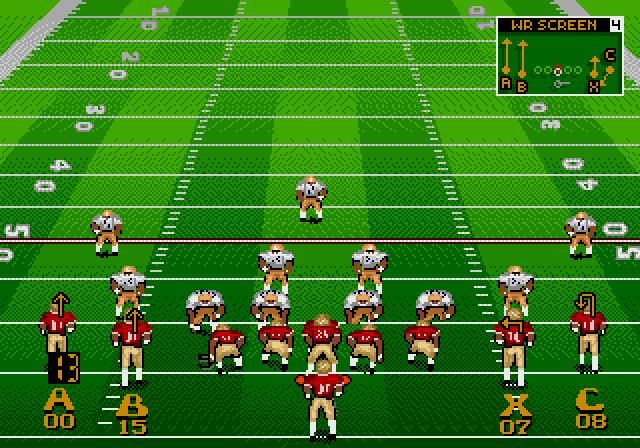
X held before the snap: the play art top right, each receiver's button and number at his feet and his route above his head

Hot routes and pre-snap play art

Hold X before the snap to see your play: its diagram at the top right, each receiver's button and jersey number at his feet, and his route above his head. On defense, X shows the play's diagram and what each defender does. To change a route, press Y, then the receiver's button, then a direction: streak, out, slant or curl, or Y for a drag and C to block. Backs get a wheel, swing, angle, check-release or screen.

  • XHold: the play art and every route
  • YOpen the hot route menu
  • AorBorCThen the receiver's button (or X, Y)
  • Then his route
  • ZCancel
The play-call screen: the Singleback, SB 3WR, SB 4WR, Pistol, 4 WR, Empty, Trips and Shotgun 2RB formations

New formations and plays

Eight new formations: Singleback, SB 3WR, SB 4WR, Pistol, 4 WR, Empty, Trips and Shotgun 2RB, with 100 plays adapted from Madden NFL 97. Also new: 67 plays from College Football USA 97, an RPO, an HB Swing, a speed option in five formations, and the Near and Far option sweeps (keep the ball or pitch it with C). The CPU calls all of them, and Flip Play works on every play.

  • XFlip the play on the play-call screen
  • YGo back to the formations
The play-call screen: SWAP HBS turns yellow when the second halfback is in

Substitute players, a first in the game

For the first time in Bill Walsh '95, you can take a tired starter out. On the play-call screen, SWAP HBS puts your second halfback in for the first. On defense, SWAP MLBS does the same for the middle linebackers. The backup plays with his own ratings, energy and stats until you swap back or the half ends. CPU teams swap when their starter gets tired.

  • ZSwap on the play-call screen
The offense flips at the line and the CPU defense realigns to match

Difficulty levels, new to the game

The original game has no difficulty setting: the CPU always plays one way. Elevated adds four levels: Normal (the original game's CPU), Smart, Elite and Champion. From Smart up, the CPU calls audibles against your formation, calls more plays to stop what has worked for you, goes for it on 4th and short, and realigns its defense when you flip a play.

Team Rosters for North Dakota State: speed 77, quickness 73, INTEL 67 and other ratings between the original steps

Ratings from 0 to 99

The original game stores every rating in 16 steps, so a player's speed jumps from 90 to 96 with nothing between. Elevated adds 16 levels inside each step, and Team Rosters shows them from 0 to 99. Players one or two points apart now play differently, so two fast backs aren't the same back. In the Dynasty app, players improve a little each offseason instead of jumping a whole step at a time.

Ole Miss on Team Rosters: impact players QB Trinidad Chambliss and HB1 Kewan Lacy have a yellow dot and a yellow position

Impact players

Every team has three impact players: its best players by position group, picked from the ratings. A white X under each one marks him all game, and Team Rosters shows a yellow dot next to his position. A hot streak puts an impact player in the zone: the X turns into a flame X, and his key ratings and awareness go up. A quarterback gets there with 4 completions in a row or a touchdown pass, a back with 3 runs of 4 yards or more in a row or a 15-yard run, a receiver with 3 catches on a drive or a 20-yard catch, a defender with a sack, a tackle for loss or an interception. A sack, an interception, a tackle for loss, a drop or a touchdown allowed knocks him out, and the zone lasts about 8 plays. CPU teams have impact players too. Both editions.

The controller screen with the uniform menu open for Utah: helmet, jersey and pants change on the player beside it

Alternate uniforms

Press Y under a team on the controller screen to pick its helmet, jersey and pants before kickoff. The player beside the menu changes as you go. Most teams have their real alternates: in the 2026 edition an extra helmet and pants, often a second colored jersey, and blackouts for the teams that wear them; in the 1994 edition mostly a second pair of pants. CPU teams wear their regular home and away uniforms unless you pick for them, and the Mod Toolkit edits every team's choices. Both editions.

  • YOpen or close the uniform menu
  • Up and down: helmet, jersey or pants. Left and right: change it
The Dynasty app: the news front page of a dynasty

Dynasty: as many seasons as you like

Our companion Dynasty app turns the game's single season into a dynasty. Import your save as you play: it keeps every score, standing, poll and stat, and writes the news. After the last game comes the offseason, and at its heart is recruiting: weeks of scouting prospects, spending points, pitching your school and making offers, then signing day. Around it come the coaching carousel with real head coaches, seniors leaving, training, conferences and the schedule, and a new Walsh Report for every team. Then it writes the next season into your ROM, rosters and all. It runs in your browser and works with both editions.

A 75-yard touchdown pass, then the recap "Pass to #1 Derrick Mayes for 75 yards" and a "75+ Yard Catch" milestone banner

Play recaps and milestones

Player names have been added alongside jersey numbers in the post-play recaps. Banners appear for game milestones, such as a catch of 75 yards or more. Ranked teams show their Top 25 rank in the score box.

Team Rosters, names view, for Kansas: each player's number, position, class and name

Real rosters for both seasons

The original game has 36 teams and no player names. Both editions have every team of their season, with real players. The 2026 rosters were the easy part, thanks to the hard work of the EA Sports team on College Football 27: all 138 FBS teams, every player named, with ratings converted from CFB 27's (Week 9 update) to this game's scale. The 1994 rosters took our own research: all 107 Division I-A teams, and 2,962 of 3,424 players with their real 1994 names, matched by team, jersey number and position from 9,872 rows of 1994 rosters. Their ratings start from a ranked list of 2,857 of 1994's best players built from 10,731 facts; each new team's players were rated to fit its 1994 record and conference, and every team's OFF and DEF ratings come from its players' 20,544 ratings. How we built the 1994 rosters

The CFP bracket screen: 12 teams, seeds 1 to 4 with a bye

Full seasons with bowls or a playoff

1994 edition: an 11-week season in the 1994 conferences or the real 1994 schedule, starting from the real 1994 preseason AP poll, then the SEC Championship Game and the 19 bowl games of that year. 2026 edition: a random schedule or the real 2026 schedule, conference title games, then a 12-team playoff. You can also pick a 24- or 4-team playoff, a BCS title game, or no postseason. In both editions, simulated games score and end close to real seasons, and home teams win more often. Multi-year dynasties are now possible too: our companion Dynasty app carries each season into the next one, for as many seasons as you like, with recruiting, player progression and coaches.

Other changes

  • More explosive plays

    Ball carriers keep more of their speed on long runs and after a catch, so big gains happen more often.

  • Pitch fix

    Pitches to fast backs no longer land behind them.

  • Bug fixes

    After a fumble on a 2-point try, the right team kicks off. The season sim no longer mixes up offense and defense ratings.

  • Faster deep passes

    Long, high passes spend less time in the air.

  • Onside kicks

    The kicking team recovers them less often.

  • Faster kickoff setup

    About 5 seconds from a score to the kickoff instead of 13.

  • Rosters on Game Setup

    Press Z on Game Setup to see any team's roster, with player names.

  • Menu music off

    Press X on a menu to turn the music off. The game remembers the setting.

Two free web apps

The Mod Toolkit

Mod Toolkit

Patches your ROM in the browser. It also edits rosters, imports College Football 27 ratings, swaps teams, sets each team's offense and defense style, edits Walsh Reports and alternate uniforms, moves teams between conferences, and sets how simulated games score and how big their stats are.

Open the Mod Toolkit
The Dynasty app

Dynasty

Runs a dynasty over many seasons: recruiting, player progression, real head coaches and a coaching carousel, schedules, a preseason Top 25, a new Walsh Report for every team each season, awards and records. After each season it writes the next season into your ROM. Both editions. Get started walks you through your first season step by step.

Open Dynasty

How to get it

  1. Get the game

    You need the original USA release of Bill Walsh College Football '95. This site does not host the game or send it.

  2. Patch it

    Open the Mod Toolkit, load your ROM and pick an edition. The Toolkit checks the ROM and builds the patched file in your browser; your file is not uploaded. You can also use the BPS patches with any BPS patcher.

  3. Play it

    Play in RetroArch with the Genesis Plus GX core, or on a flash cart such as the Mega EverDrive Pro. The new controls need a 6-button pad. For a dynasty over many seasons, start one in the Dynasty app and import your save as you play.

Insights

Articles on how the game's code works and what the mod changes: what each rating does, how simulated games are decided, how fatigue works.